Power Apps PCF Association Table Control for Joint (Many-to-Many) tables
I'm not particularly eager to rely on Dataverse's OOTB Many-to-Many (N:N) relationship due to its limitations and, in most cases, do opt for custom association (joint) tables.
I’m not particularly eager to rely on Dataverse’s OOTB Many-to-Many (N:N) relationship due to its limitations and, in most cases, do opt for custom association (joint) tables.
Yes, it is a bit of extra work; however, with a custom table, it is possible to get full control over that many to many relationships and have more control and functionality with no significant downsides on the performance of database size.
Pros
The common reasoning to opt out from OOTB N:N relationship to a custom joint table:
- Ability to work with records in bulks (OOTB feature to export/import MS Excel)
- Ability to present available choices/records in UI (aka toggle/checkbox UX)
- Have complete control over taxonomies, configuration and templates, and simple maintenance by business/end users
- Allow multiple records with additional info to preserve historical information and have extensive audit logs
- e.g., when we had and removed an attribute or had to for specific periods of time
- Extensibility and futureproofing. Available in the Power Apps Maker Portal, thus can be extended and customized with
- additional fields
- business logic (anything, business rule, automation, custom code)
- security
Data Model Difference
Here is how it differs from the data model perspective at Dataverse level.
Note: At MS SQL level, it might be the same; tables-wise, there is a table at DB level. It is just not accessible at Dataverse for us, but since we do not work with it directly, who cares.

Cons
One of the caveats to this approach is a change in UX. Instead of relating records, users now have to create records in that association table manually, or automation is needed for each of such tables.
I’ve used to resolve that caveat on a need basis with such automation (real-time D365 workflows) or for advanced scenarios with UI programming (on form JS code), and that has to be applied on D365 (Model-Driven Apps) forms.
Solution
With PCFs introduction, we got an easy option to have something reusable I’ve got a chance to introduce a PCF for this, which just needs to get added to the form you need it on.
The control technically is very similar to the existing solutions for N:N visualization, or tags. Here are some similar PCFs available at the moment.
- https://pcf.gallery/n-to-n-multiselect
- https://pcf.gallery/checkbox-list
- https://pcf.gallery/nn-checkboxes
- https://pcf.gallery/tag-picker-grid-component
- https://pcf.gallery/nndropdown
- https://pcf.gallery/nntree-control
However, there were no PCF to support visualization and provide simple UX for custom association tables vs Dataverse OOTB N:N relationship.
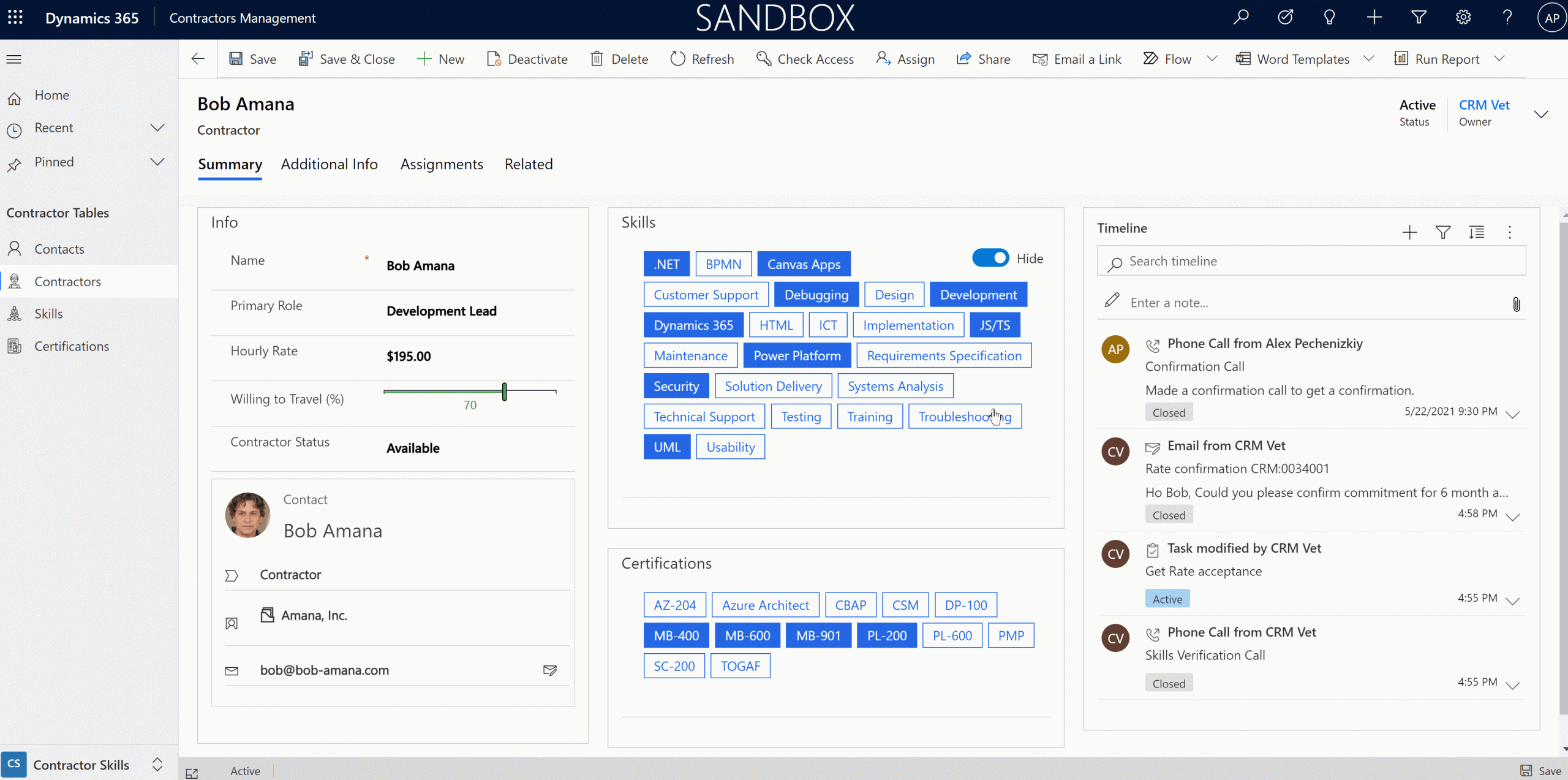
How it looks in the User Interface

Records in the associated table are just being created and deleted by this control when user in UI selects values. Visual representation and filtering can be tuned per specific scenario.
How to get it
The PCF is free to use or contribute by anyone available as a managed solution and a source code at GitHub.
Do not forget to check other amazing PCF controls at pcf.gallery
Feedback and Enhancements
Please feel free to contact me via LinkedIn to provide feedback or get support or suggest ideas for enhancements.
I do have other versions I’m playing with for specific scenarios to support filtering and scoring models.
Stay in the loop
Get new posts delivered to your inbox. No spam, unsubscribe anytime.
Related articles
Microsoft Power Platform - Expanding Dynamics 365 CRM
The importance of data for organizations is increasing every day. However, you often find yourself lost in optimizing business processes while completely ignoring the importance...
Where do I begin learning Power Platform?
Over and over again, I see the same question on social media that everybody is tired of answering, and people are not getting a proper helpful response.
Free training and support for Power Platform and Dynamics 365 CRM exams and certifications (MB-910, PL-900, PL-200)
For the last few years, I volunteered and helped people get started and grow their Dynamics 365/Power Apps careers, helping them learn, get practice and hands-on experience, and...